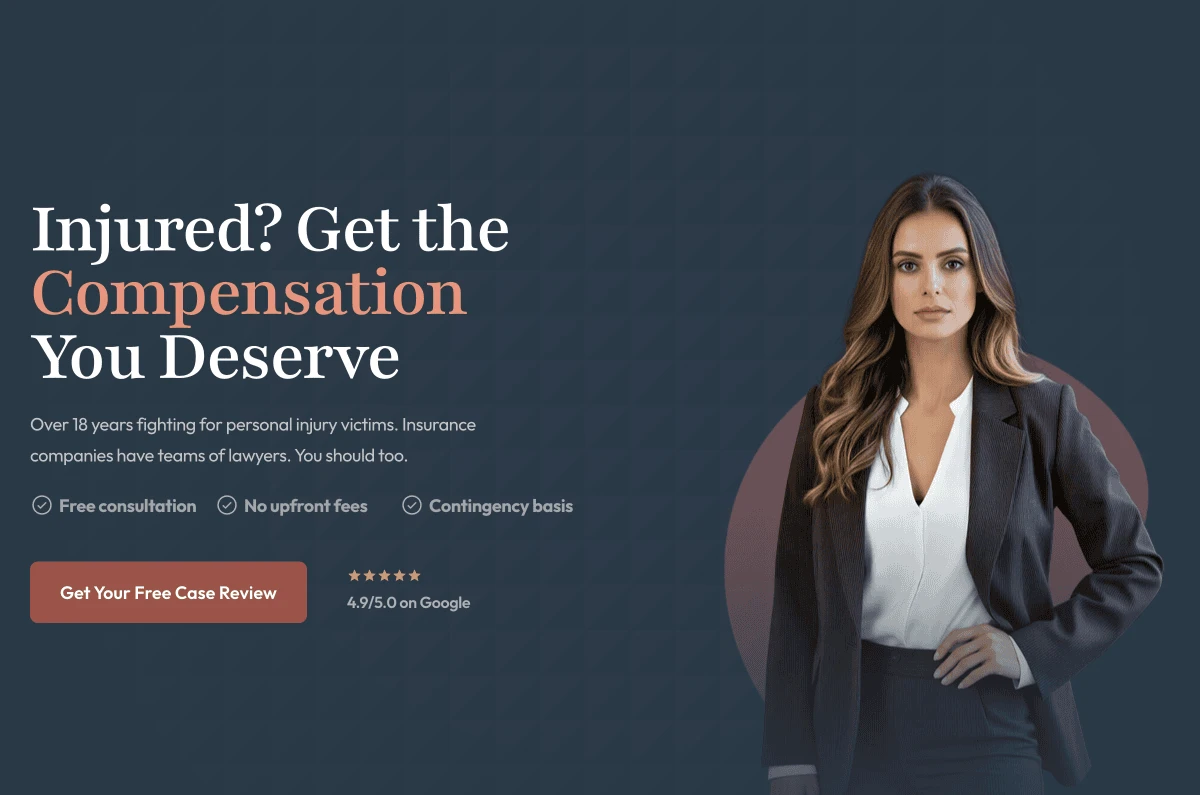
A fully built personal injury website designed around one goal — turning visitors into consultations. Every section, every layout decision, and every word has a reason behind it. This is what a high-conversion PI website looks like in practice.
Practice Area
Personal Injury
Type
Website
Focus
Conversion Design
That sounds obvious, but it's actually the core issue. Walk through ten personal injury attorney websites and you'll see the same things: a generic stock photo of scales, a headline that says "Fighting For You," a wall of text nobody reads, and a phone number buried at the bottom.
These sites were built to exist, not to convert. They check the box of "we have a website" and nothing more. The problem is, a visitor who finds you at 10pm after a car accident isn't browsing. They're scared, overwhelmed, and they need to make a decision fast. A website that doesn't speak to that moment is leaving cases on the table every single week.
The person landing on your site already searched for a lawyer. The only question is whether your website convinces them to call you or the next person on the list."
Sarah's site was designed to answer that question decisively. Not with bells and whistles, but with the right information in the right order, delivered in a way that feels trustworthy and human.
Every section on a personal injury website has a specific job to do. If it's not moving the visitor closer to picking up the phone, it shouldn't be there. Here's the thinking behind each part of this structure — and why it works.
The headline "Injured? Get the Compensation You Deserve" answers two questions instantly: who this is for and what they'll get. Then the subheadline — "Insurance companies have teams of lawyers. You should too." — creates urgency by framing the power imbalance the visitor already feels but hasn't articulated. There are two CTAs side by side: one for people who want to read more, one for people ready to call right now. Both audiences are served above the fold.
Directly below the hero: Avvo rating, AV Martindale badge, Super Lawyers, Million Dollar Advocates. These aren't decorations. They're the fastest way to answer "is this person actually good?" for someone who has never heard of the attorney. A visitor who lands cold can verify credibility in under three seconds without reading a word.
Three numbers: total recovered, client success rate, families represented. These are placed early and prominently because they compress years of experience into something a visitor can grasp in one glance. People hire personal injury lawyers on outcomes. Show the outcomes.
Every testimonial on the site includes the settlement amount recovered, front and center. This is deliberate. "She was amazing" means nothing. "$125,000 recovered when the first offer was $8,000" means everything. The visitor reads the story and thinks: that could be me. That's the response you want.
Most law firm bios sound like they were written for a bar association directory. A good PI bio talks directly to a scared injury victim, not to other lawyers. It explains why the attorney started the practice, what they've seen insurance companies do, and what they're going to do about it. Credentials are listed, but they come after the human story — because people hire people, not resumes.
People often self-disqualify. They think their slip and fall or workplace injury isn't worth a lawyer's time. The practice areas section exists to explicitly name their situation and say: yes, we handle that. Each category is written with the visitor's doubt in mind, not as a legal taxonomy.
The biggest barrier to calling a lawyer is not knowing what happens next. A five-step process section — Free Consultation, Investigation, Negotiation, Litigation, Recovery — shows the visitor exactly what they're walking into. It's not complex. It's reassuring. And it ends with "You only pay us if we win," which removes the last financial objection.
The "Important Information" section covers statute of limitations, recorded statements, documenting evidence, and the contingency model. These aren't nice-to-haves. They're the exact things that stop people from taking action. Addressing them on the page means fewer calls lost to hesitation. The FAQ goes deeper on the most common questions, reducing friction for visitors who want one more answer before they reach out.
Here's a number worth knowing: over 70% of people searching for a personal injury attorney do it from their phone, often right after an accident or while waiting at a hospital. They're not sitting at a desk. They're scrolling with one hand, probably stressed, and they don't have a lot of patience.
Now think about what happens when they visit a typical law firm website on mobile. They scroll through the hero. They read a bit. They keep scrolling. The phone number is in the nav — which collapsed into a hamburger menu. Or it's in the footer, which they'll never reach. By the time they've done all that, they've already moved on to the next result on Google.
This is a real problem. And it has a simple fix.
A sticky mobile bar sits at the bottom of the screen at all times. It doesn't disappear when the visitor scrolls. It doesn't require them to navigate anywhere. No matter where they are on the page — reading a testimonial, checking credentials, halfway through the FAQ — the call button and the case review button are right there.
This is the single highest-impact element on a mobile law firm website. Not the headline, not the photography, not the color palette. The thing that makes people call is a button that's always visible.
Friction kills conversions. Every extra step between "I want to call" and "I'm actually calling" is a chance to lose that person. The sticky bar eliminates the step of having to find the number. The visitor made the decision to call, and the button is right there. That's the whole point.
A sticky bar that also shows "LIVE" status reinforces that someone is available to take the call right now. Small detail. Meaningful signal.
Most law firm sites use either generic system fonts or overly formal serifs that feel cold. Sarah's site uses a clean, professional typeface system that reads well on all screens and signals competence without feeling stuffy. Headings are authoritative. Body copy is warm and easy to read. The hierarchy is clear — you always know what to read next.
The palette avoids the red-and-gold "aggressive attorney" look that has become a cliche. Instead it uses a neutral base with restrained accent use, letting the content — especially the settlement numbers — do the heavy lifting. This approach signals that Sarah is a serious, results-focused professional, not a late-night TV lawyer.
The hero image is a full-length portrait of the attorney, not a stock photo of a courthouse or a gavel. People hire people, not firms. Seeing a confident, professional attorney immediately builds more trust than any abstract imagery. The photo is placed to bleed into the hero section, creating visual interest without feeling staged.
Every section of the site ends with, or contains, a call to action. Not aggressively — naturally, as a next step. The visitor is guided from interest to trust to action without ever feeling sold to. The CTA copy is action-oriented ("Get Your Free Case Review") rather than passive ("Learn More"), which makes a measurable difference in clicks.
Dual CTA buttons in the hero — one for callers, one for form submitters — capturing both intent types
Settlement amounts displayed prominently in each testimonial card, making results impossible to skim past
Statute of limitations warning prominently surfaced to create urgency without manipulation
Trust badges grouped above the fold so credibility is established before the visitor reads anything
Mid-page CTA after the attorney bio, capturing visitors who are warm but not yet ready to scroll to the bottom
FAQ section that uses the exact language an anxious injury victim would search, improving SEO and trust simultaneously
This isn't a brochure site. It's not there to look nice on a business card or satisfy a bar association requirement. Every design decision, every word, and every structural choice was made to do one thing: convert a visitor who is already looking for a personal injury attorney into someone who calls or submits a form.
The site is also built to rank. Practice area pages are structured around the exact phrases people type into Google when they're hurt and looking for help. The content isn't written for search engines first, but it's structured in a way that search engines understand and reward.
Finally, the site is fast and fully responsive. It loads in under two seconds on mobile, which matters both for user experience and Google ranking. On desktop it adapts to fill the screen without any layout breakage. It looks as good on an iPhone SE as it does on a 27-inch monitor.
A website for a personal injury attorney has one job. Make the phone ring. Everything else is secondary.
See the Website